|
|
|
Answer a phone call using Gizmo client.
|
|
|
Cut costs and increase flexibility by integrating Anveo with your Gizmo client.
You and your employees can answer a phone call on any computer that is connected to the Internet using Gizmo client.
Moreover, it is possible to switch a phone call to Gizmo client in the middle of the conversation.
To use Gizmo client with Anveo simply obtain an SIP number for your Gizmo client and configure Gizmo Call Control.
|
|
Gizmo Call Control
|

|
|
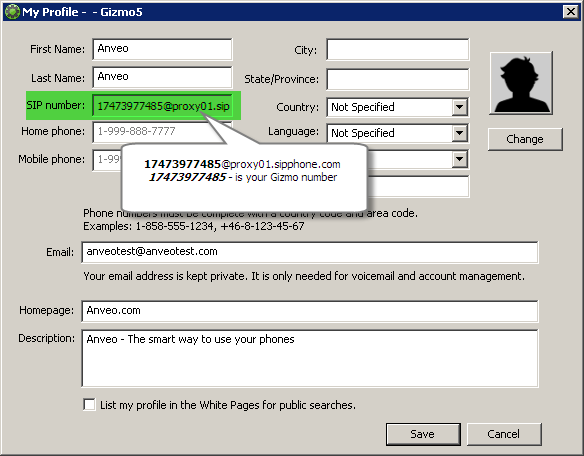
Gizmo SIP Number
|
|
You can find your SIP Number on 'My Profile' screen. Alternatively, you can get your SIP Number, by using your Gizmo client to dial ** and hear an automated voice read your SIP Number back to you.
|
|

|
|
|